 Skip to content
Muluwin Withdraw: How to Request a Payout
Wallet · Withdrawals
Cashing out on Muluwin starts on the “Withdraw Your Winnings” screen, where your available balance sits at the top and four payout methods sit below it.
A Muluwin withdrawal is submitted from the “Withdraw Your Winnings” screen in the Wallet tab. Check your available balance, choose UPI, PhonePe, Paytm, or Bank Transfer, enter accurate payout details, pick an amount, and submit the request for processing.
What does withdrawing from Muluwin actually involve?
Cashing out simply reverses the deposit flow: money leaves your Muluwin balance and lands in an account that belongs to you. Instead of feeding the wallet, you’re pulling winnings, or a balance you never got around to playing, back into your own hands.
Look for the screen titled “Withdraw Your Winnings,” where a balance figure sits above the method options. That number, not any preset button, decides the real ceiling on what you’re able to pull out right now.
- A payout leaves the app and arrives at a UPI ID or bank account you control
- Pick from four routes: UPI, PhonePe, Paytm, or Bank Transfer
- Amount buttons mirror the deposit side — ₹500, ₹1,000, ₹2,000, ₹5,000, ₹10,000 — next to an open field for anything else
Which payout method matches how you already bank?
The right choice usually mirrors whatever method you used to deposit in the first place.
You want funds in a UPI app
UPI sends the payout straight to whichever UPI ID you enter, without full account and IFSC details.
You deposited through PhonePe or Paytm
Using the matching linked UPI ID for withdrawals keeps your payout history in one app.
You’d rather skip UPI apps entirely
Bank Transfer sends the payout directly into an account using your account number and IFSC code.
How do you submit a withdrawal request on Muluwin?
The request takes a minute to fill in; how fast it clears is really up to your bank or payment provider.
- Open the Wallet tab Open Wallet from the bar along the bottom of the screen, then tap “Withdraw” to reach the “Withdraw Your Winnings” screen.
- Check your Available Balance That number above the method list marks the ceiling on what you can pull out right now.
- Select a withdrawal method Choose UPI, PhonePe, Paytm, or Bank Transfer depending on where you want the payout sent.
- Enter your payout details carefully Type your UPI ID, or your account number and IFSC code for Bank Transfer, and read them back before moving on.
- Pick an amount and submit Tap a quick amount or enter a custom figure within your balance, then tap “Withdraw Now” to send the request into processing.
Once submitted, the request sits in processing — it can’t be edited from this screen, so double-check details before you tap submit.
What details does each withdrawal method need from you?
Each method asks for a slightly different piece of information.
| Payout route | Details you must enter | Suits |
|---|---|---|
| UPI | A valid UPI ID linked to your own account. | A fast payout to any UPI-linked app you use. |
| PhonePe | Your PhonePe-linked UPI ID. | Players who deposited through PhonePe. |
| Paytm | Your Paytm wallet balance or its linked UPI ID. | Players who deposited through Paytm. |
| Bank Transfer | Your account number and IFSC code. | Players who’d rather see cash arrive straight into a bank account. |
Timing between methods isn’t specified on the withdrawal screen itself; both UPI options and Bank Transfer are simply listed as supported.
Why would a Muluwin withdrawal get held up?
A stuck payout is usually one specific detail, not a broad system fault. Working through likely culprits in order beats firing off the same request again.
- Name mismatch: if the name on your payout account doesn’t match your registered profile, the request can sit until the mismatch is fixed.
- Mistyped ID: one wrong digit sends a UPI request nowhere useful, so read it back slowly before submitting.
- Number unverified: an unconfirmed mobile number can block a payout — verify it from account settings.
- Bonus funds locked: money from a bonus can carry a play-through requirement, so that slice stays unwithdrawable until it clears — check the Promotion tab for terms.
No fixed clock applies here. Resolution speed depends on your bank, your provider, and how fast support works the request once flagged.
How do you keep your payout details clean for next time?
Accuracy, not speed, is what keeps a payout from stalling. Run through this list before every submission.
- Match the name on your payout account with your Muluwin profile name
- Type your UPI ID fresh each time instead of trusting memory, and glance over it once more
- Cross-check any account number and IFSC code against a passbook or statement for Bank Transfer
- Verify your mobile number ahead of time so an OTP step never becomes the blocker
- Confirm the figure fits inside what’s actually free to withdraw, not locked into a bonus condition
- Note or screenshot every request until the money shows up
What does the withdrawal screen and balance view look like?
Seeing the real layout in advance makes the first payout request less of a guessing game.
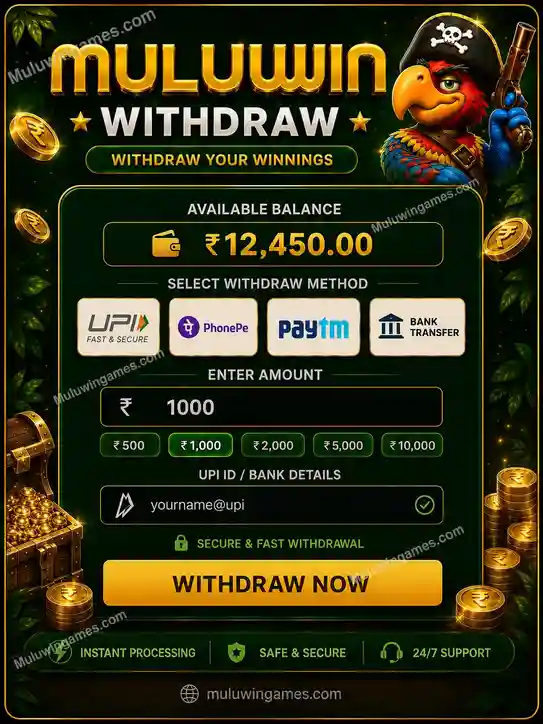
Withdraw Your Winnings
Available balance sits at the top, with UPI, PhonePe, Paytm, and Bank Transfer listed as the four payout methods below it.

Getting back to the Wallet tab
The same Wallet icon used for deposits leads to withdrawals too, so there’s only one tab to remember.

Deposits and withdrawals mirror each other
Once you’ve made a deposit, the withdrawal screen’s layout will already feel familiar.
Is it safe to withdraw from Muluwin, and what should you watch for?
This platform is for adult players only, and the legal position on real-money gaming differs by Indian state and shifts over time — check your own state’s rules before counting on a payout. Nothing here confirms the legal position for every region.
Payout details should always be your own, never someone else’s, and every request should come from inside your own logged-in account, not a forwarded link.
- Re-check account numbers and IFSC codes before a Bank Transfer request goes out
- Hold a note of each request until the money is actually in your account
- Winnings come from chance-based games, so treat them that way, not as a repeatable source
- Spotted a detail error right after submitting? Contact in-app support quickly rather than guessing
- BeGambleAware.org lays out signs that gaming may be turning into a problem, worth a look before committing serious time or money
What should you remember about withdrawing from Muluwin?
- Withdrawals are requested from the “Withdraw Your Winnings” screen inside the Wallet tab.
- Your Available Balance shown on screen is the real cap on how much you can request.
- Four methods are supported: UPI, PhonePe, Paytm, and Bank Transfer.
- Name mismatches, wrong UPI IDs, an unverified mobile number, or pending bonus wagering are the usual causes of a hold-up.
- Bank Transfer needs an account number and IFSC code; the other three need a UPI ID.
- Double-check every detail before submitting — a request can’t be edited once it’s sent.
What else do players ask about cashing out?
What’s the lowest figure I’m able to cash out in one go?
₹500 is the smallest preset button here, matching the low end on the deposit side too.
Is it possible to send my payout to a fresh UPI ID instead of my usual one?
The form accepts whichever UPI ID you type in at that moment. Sticking with your usual, already-verified one is the smarter move, since a name that doesn’t match your profile can stall things.
How quickly does a payout land after I submit it?
No fixed duration is promised on that screen — completion speed comes down to whichever bank or UPI service is handling it on the receiving end. A wait that drags on is worth checking against your bank app and the reference you were given.
Once I hit submit, can a payout request still be undone?
No. The moment it’s sent, it moves into processing, and there’s no edit or cancel option sitting on that screen afterward.
My payout is sitting as pending — what’s likely going on?
Usual suspects are a mismatched name, a UPI ID with a typo, a mobile number that’s not verified, or part of the balance still tied to a bonus condition.
I realized my bank details were wrong after I’d already submitted — now what?
Reach support inside your account right away rather than guessing your way through another submission.
Does choosing Bank Transfer mean a longer wait compared with UPI?
No confirmed difference exists on the screen itself — both simply appear as available payout routes without a stated speed comparison.
Can bonus money be cashed out the same way regular deposits are?
Not always immediately — bonus credit often comes with a play-through condition first. The Promotion tab in your account lays out what applies.
Ready to cash out your balance?
Open the Wallet tab on the Muluwin app, confirm your Available Balance, pick the payout method that matches your usual banking habit, and double-check your details before you submit the request.
